
Environment
- Product: SOLABS QM10
- Versions: All versions
- Client Software: Microsoft 365 Apps (Microsoft Office) on Windows, including Excel, Word, PowerPoint, Access, Project, Publisher, and Visio
- File Type Affected: Office documents containing Visual Basic for Applications (VBA) macros that are downloaded from SOLABS QM10
Issue/Symptoms
When a user opens an Office document that contains one or more macros after downloading it from SOLABS QM10, the macros do not run.
Common symptoms include:
- The following error message is displayed when the macro is triggered:
Cannot run the macro "<macro name>". The macro may not be available in this workbook or all macros may be disabled. - A red SECURITY RISK banner may appear at the top of the document, indicating that Microsoft has blocked macros from running because the source of the file is untrusted.
- No Enable Content button is available to allow the macros to run.
- The same document runs its macros normally when it is not downloaded from the internet (for example, when it is created locally).

Cause
Microsoft introduced a security change in Microsoft Office that blocks macros by default in files obtained from the internet. Windows identifies these files using an attribute called Mark of the Web (MOTW), which is added automatically to files downloaded through a web browser.
Because SOLABS QM10 is accessed through a web browser, Office documents downloaded from SOLABS QM10 receive the Mark of the Web (MOTW) attribute when they come from a location that Windows classifies in the Internet zone. Office then blocks the macros in these documents, which results in the error message described above.
This behavior is caused by Microsoft Office security settings and is not a SOLABS QM10 defect.
Resolution
Two options are available. Use the workaround to correct a single file quickly, or apply the permanent solution so that Office files downloaded from SOLABS QM10 are no longer blocked.
Workaround: Unblock an Individual File
- In Windows File Explorer, right-click the downloaded file and select Properties.
Expected outcome: The file’s properties window opens on the General tab. - At the bottom of the General tab, select (check) the Unblock checkbox.
- Click OK.
Expected outcome: The Mark of the Web (MOTW) attribute is removed from the file. The document opens and its macros run normally.

Permanent Solution: Add SOLABS QM10 to the Local Intranet Zone
- Open the Windows Control Panel, then select Internet Options.
Expected outcome: The Internet Properties window opens. - Select the Security tab.
- Select the Local intranet icon, then click Sites.
Expected outcome: The Local intranet window opens. - Click Advanced.
Expected outcome: A window opens where websites can be added to the zone. - In the Add this website to the zone field, enter the Uniform Resource Locator (URL) of your SOLABS QM10 instance (for example,
https://[yourinstance].solabs.com/qm), then click Add.
Expected outcome: The URL appears in the Websites list. - Click Close, then click OK to close the Local intranet window.
- With Local intranet still selected on the Security tab, ensure the security level is set to the default: Medium-low.
- Click OK to save the changes and close Internet Properties.
Expected outcome: Office documents downloaded from SOLABS QM10 after this change are no longer blocked, and their macros run normally. 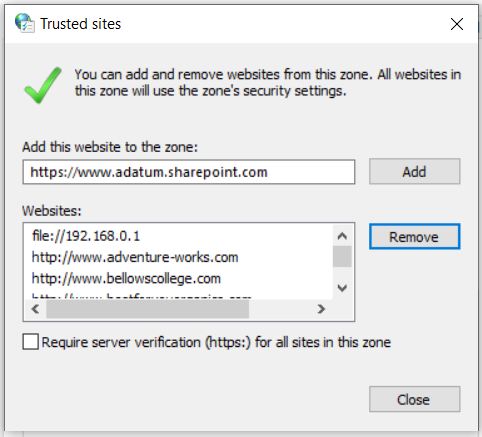
Additional Information
- Previously Downloaded Files: The permanent solution applies only to files downloaded after the configuration change. Files downloaded before the change keep their Mark of the Web (MOTW) attribute and must be unblocked using the workaround, or downloaded again.
- Validation Requirement: Modifying Windows Internet security zones changes the workstation’s security configuration. In validated environments, this change may be subject to your organization’s change control procedures. Consult your Information Technology (IT) department before applying it. IT administrators can also deploy this setting to multiple workstations through Group Policy using the “Site to Zone Assignment List” policy.
- Preventive Measure: Apply the permanent solution on all workstations used to open macro-enabled Office documents from SOLABS QM10.
- Known Limitation: This behavior affects Microsoft Office on Windows only. Office for Mac, Office on mobile devices, and Office on the web are not affected.
- Version Information: No SOLABS QM10 update is required. The behavior is controlled by Microsoft Office and Windows settings.
- Related Articles: Macros from the internet are blocked by default in Office
Comments
0 comments
Please sign in to leave a comment.